User subscriptions and Pricing selection
Use this flow to calculate a selected Pricing, submit payment and decide what to show afterward. Keep the same member and resource throughout. Read each transaction before showing completion. A purchase records account activity, a membership links the member to a Plan/Pricing, and a receipt is a document. None replaces the content-access decision.
Flow at a glance
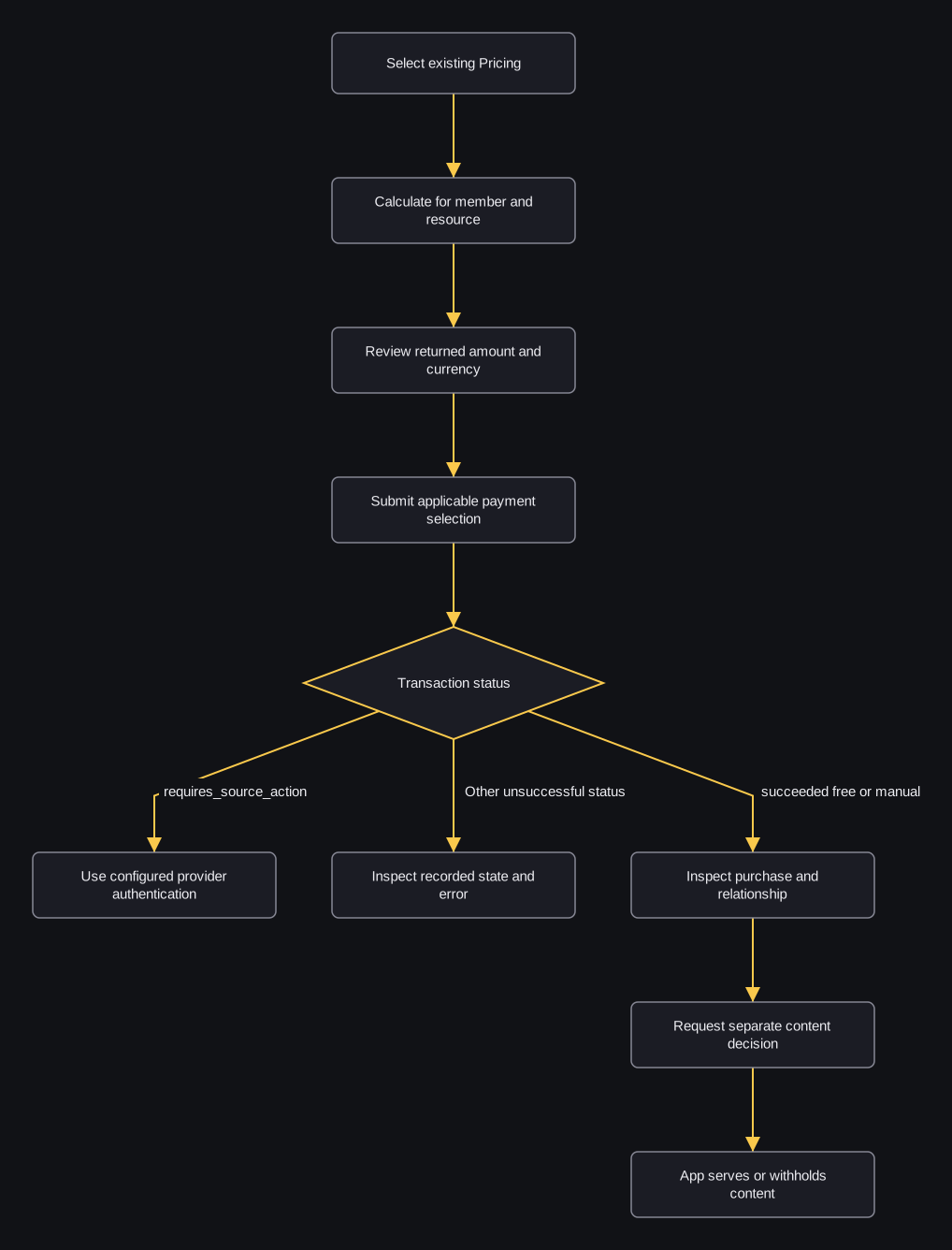
flowchart TD
    A[Select existing Pricing] --> B[Calculate for member and resource]
    B --> C[Review returned amount and currency]
    C --> D[Submit applicable payment selection]
    D --> E{Transaction status}
    E -->|requires_source_action| F[Use configured provider authentication]
    E -->|Other unsuccessful status| G[Inspect recorded state and error]
    E -->|succeeded free or manual| H[Inspect purchase and relationship]
    H --> I[Request separate content decision]
    I --> J[App serves or withholds content]
Calculation does not reserve a price or create a saved purchase. Payment calculates the amount again, can use up promotion eligibility and can write each payment group separately. An HTTP 200 transaction can still require provider authentication; use your configured provider integration to finish that branch. There is no single completion sequence for every provider.
A successful transaction attempts relationship creation, but caught failures can leave a missing relationship. Replacing a membership or applying single_subscription can delete existing memberships; with auto_clear_content_views enabled on a deleted membership's resource, this can clear the member's content-view records across resources. The application uses the separate content decision before serving an article.
Ordered selection and interpretation
- Establish ordinary member identity or the configured Firebase identity. Retain the same resource public key and member context throughout.
- Read the catalog and select available Pricing 2001. A Pricing ID does not identify an existing membership.
- Calculate the single Pricing item. In the illustrated scenario, the effective total is 1200 USD in the integration's configured units. Check currency, trial/upgrade flags and discount; do not display a mixed-currency aggregate as one converted total.
- After the member chooses to proceed, submit payment for Pricing 2001 with existing saved source 3001. Follow the payment-source guide to read the compatible local saved ID; modern
payment_method.id3001 supplies checkoutpayment_method_id3001. Provider-client tokenization/setup remains an existing external prerequisite. - Inspect every transaction. A succeeded transaction 4001 with purchase 5001 and relationship 6001 describes recorded state. requires_source_action means authentication remains; a 406 can contain earlier processed groups. Retain IDs and inspect errors before another payment attempt.
- Request the content-access decision for the intended article. If allow is false, withhold content and use the returned explanation; payment HTTP success does not override that decision.
Conditional Stripe branch
A SetupIntent request creates a provider setup object for an existing customer. It does not create a charge or establish a saved Wallkit source by itself. Use only the existing provider setup integration.
If that integration supplies an existing PaymentIntent/local transaction requiring confirmation, preserve the intended member/resource/intent/source association. Confirmation writes local succeeded/purchase state before its provider call and does not derive local status from the provider answer. Thus its response needs existing account/provider reconciliation; it cannot be treated as independent proof of settlement. Do not apply this step to a SetupIntent or every payment.
For catalog presentation before member identity, the single-Pricing calculator uses a fresh user object. Its trial/eligibility/tax context can differ from the personalized calculation. Use member calculation before displaying that member's payable amount.
Inspect account state and documents
Continue the same synthetic Pricing 2001 / transaction 4001 / purchase 5001 scenario after the applicable checkout branch:
- Read memberships in the selected resource. The exposed id is Pricing 2001; dates and renewal flags describe the current relationship. Several relationships can repeat that Pricing ID. This does not itself grant an article.
- If the member chooses to change renewal preference, POST autorenew against Pricing 2001. false stops that preference; it does not delete the membership, refund transaction 4001 or perform a charge. Read the returned user state and errors. Existing profile PUT/DELETE operations have their own scope.
- Read purchases for stored activity across resources. Purchase 5001's nested transaction.id is 4001. Do not display this list's sub_total as payable amount: that projection copies discount. A purchase can exist alongside a failed transaction.
- Read the resource transaction list or detail 4001. The list is limited to the member and selected resource. Detail checks owner/admin permission but does not require the transaction to belong to the selected resource. Treat status as recorded state and keep originating provider-flow caveats. purchases/refunds can be empty and receipt/payment_source can be null.
- Choose the document task. Invoice download renders a PDF immediately; receipt generation requests an event and returns success:true without a link or completion guarantee. These are different operations. Generation can later replace older receipt records/files; repeated requests have no single-use guarantee.
- When detail returns receipt.download_link, use its supplied user/file hashes for stored receipt download. Download validates the active record/hash association and updates a count after streaming. Handle binary data separately from JSON errors and use the actual media type; the receipt uploader stores the extension pdf as ContentType.
If a promotion is supplied
Promotion validation checks resource/date/global activation context, not a selected item's discount. Include an accepted code in the member calculation, then display its returned discount/promo. An unrelated item can remain undiscounted. Payment can record activation before provider success, so validation is not a reserved discount or retry token.
Interpret outcomes before showing completion
| Result | What your app can infer | What follows |
|---|---|---|
| Calculation 200 | Current calculated selection in the stated context. | Review amount/currency and the applicable provider/source prerequisites. |
| Payment 200 + requires_source_action | Authentication remains; request stopped before that group's purchases. | Retain local/provider identity and use the configured authentication flow. |
| Payment 406 + transactions | Some groups may already have records/effects. | Inspect each group/error and reconcile before another payment attempt. |
| Local succeeded/free/manual | Wallkit treats the recorded status as successful; originating flow matters. | Inspect actual purchase/relationship and provider context; request separate access. |
| Receipt generation success:true | Generation event request returned. | Inspect the later receipt record/availability; no delivery/completion claim. |
| Binary invoice/receipt | A document was streamed. | Handle the bytes; do not infer settled payment or entitlement from a document. |
| Content decision allow:false | This decision withholds the requested content. | Withhold the article and use its returned explanation. |
The business map explains Plan → Pricings and memberships. The checkout fields and account response fields describe each result. Payment, purchase and receipt responses differ; provider steps also differ.