Choose and save a payment source
Use a saved Wallkit source ID for checkout. A provider customer, provider method and Wallkit saved source are different identifiers.
Modern Stripe path
- Start with an existing member/resource, configured Stripe account and resource default_paysystem set to stripe. Read or create the modern Stripe customer to obtain its provider customer association. This GET can create/delete local customer records and create a provider customer; inspect partial failures before repeating.
- Create a customer SetupIntent.
- Complete setup with the existing provider client. This external step returns the attached provider method; it does not itself save a Wallkit source.
- Save the method. This attempts local persistence and local default selection.
- Read sources. For payment-method use payment_method.id, for example 3001.
- Send local payment_method_id 3001 with selected items to member calculation, then payment. Interpret transactions and access separately from HTTP success.
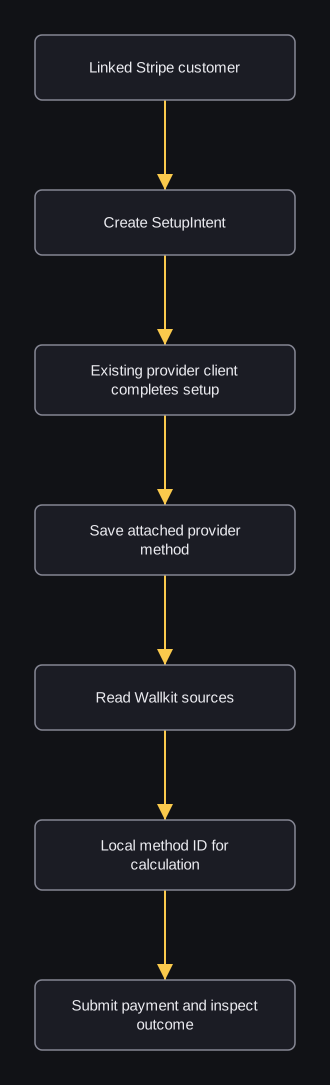
Where does setup stop and checkout begin?
flowchart TD
  A[Linked Stripe customer] --> B[Create SetupIntent]
  B --> C[Existing provider client completes setup]
  C --> D[Save attached provider method]
  D --> E[Read Wallkit sources]
  E --> F[Local method ID for calculation]
  F --> G[Submit payment and inspect outcome]
The SetupIntent prepares provider setup. The external client completes it. Saving attempts to store Wallkit records and select a local default. Read the saved sources to get the local ID for checkout.
Saving does not verify that the SetupIntent completed, create a charge or set a provider default. Inspect saved sources after partial failures before repeating a write.
This sequence assumes the resource default provider is stripe: saving always uses Stripe for its customer association, but duplicate checks and local method/card default resets use the resource default provider.
A different default can leave duplicate/default Stripe records, clear another provider’s defaults, and cause the unqualified source list to omit the saved Stripe method.
The list does not filter live/test mode; Stripe setup/save use the resource’s configured operator mode.
Other configured paths
Legacy cards, Stripe token/customer operations, Braintree and Square have distinct prerequisites and identifiers. Use the provider-specific references and comparison below.
Integration Stripe OAuth configures an account; it is separate from member source setup. No universal sequence combines these alternatives.
Change or remove a saved source
Select a default with the returned source_type and its local ID. For payment-method this changes local flags and attaches the provider method; it does not update the provider’s invoice default. For user-card it updates the legacy provider default_source.
Remove a source when it should no longer be selected. Linked card/method records can also be removed, and provider detach/delete occurs. Customer/resource associations remain; membership and refunds are separate. Read sources afterward and choose another source explicitly: deletion does not select a replacement default. Shared customer records and provider effects can extend beyond this resource, and database rollback does not undo provider actions.
Legacy card/customer path
Use legacy customer import with either the provider customer ID or token/nonce from the existing provider client; do not supply both branches. Read owned customers for local customer IDs and resource cards for local card ID 5001, then pass user_card_id 5001 to member calculation/checkout.
Resource attachment is conditional on configuration and must be inspected.
Explicit attachment has no independent owner/destination permission check; trusted integration code must establish those associations.
Legacy default changes local flags across attached providers without updating provider default. Legacy removal deletes only the local card and may choose a replacement; it leaves provider card and linked method intact. Use the compatible modern operation when provider detach is intended.
The native-card action is deprecated in the reviewed source. Its example shows the field layout with an invalid placeholder. Attempt gating writes an attempt and can lock/suspend the member, but does not validate or attach a card.
Legacy Stripe alternatives
The token route consumes a provider token and creates a customer; it does not generate a token. The Stripe customer route also consumes a token under customer_id. Existing-provider-customer import uses the generic customer action instead. Both Stripe-named creation routes select the resource default operator; assume a configured stripe default for this alternative.
Legacy method confirmation attaches a provider method then persists supplied local references without independent ownership/intent/default checks. It is a separate legacy path, not a required extra step after modern save-intents or checkout PaymentIntent confirmation. Local customer removal does not delete the provider customer and can affect a shared local record.
Braintree and Square alternatives
For Braintree, use a nonce from the existing configured provider client with customer creation, then read local cards for user_card_id 5002. The legacy client-token route has a missing active initializer at this source pin; it is not a promised working prerequisite. Client token and nonce are different values. Braintree import does not establish a default card or universal modern method.
For Square, consume its existing source token to create customer/card records, then read local user_card_id 5003. Provider creation and local import/default writes can partially complete. Local customer removal does not delete provider customer/cards. Both alternatives need the matching configured account/mode, and resource attachment must be inspected before checkout.
Choose the compatible stopping point
| Existing integration | Input | Saved result / next step |
|---|---|---|
| Modern Stripe, default provider stripe | Linked customer → SetupIntent → existing provider-client setup → save method | Read local payment_method.id 3001; calculate/payment use payment_method_id 3001. |
| Legacy Stripe customer/card | Provider token, or generic import of existing provider customer | Read local user_card.id 5001; calculate/payment use user_card_id 5001. Token routes do not generate token. |
| Braintree | Existing provider-client nonce | Read local user_card.id 5002; no universal default established. Legacy client-token generation is not established at this pin. |
| Square | Existing provider-client source token | Customer/card creation then local import/default; read local user_card.id 5003. |
| Stripe integration OAuth | Existing authorized admin callback code/mode | Resource connection credentials; then member source setup separately. No saved member source or charge. |
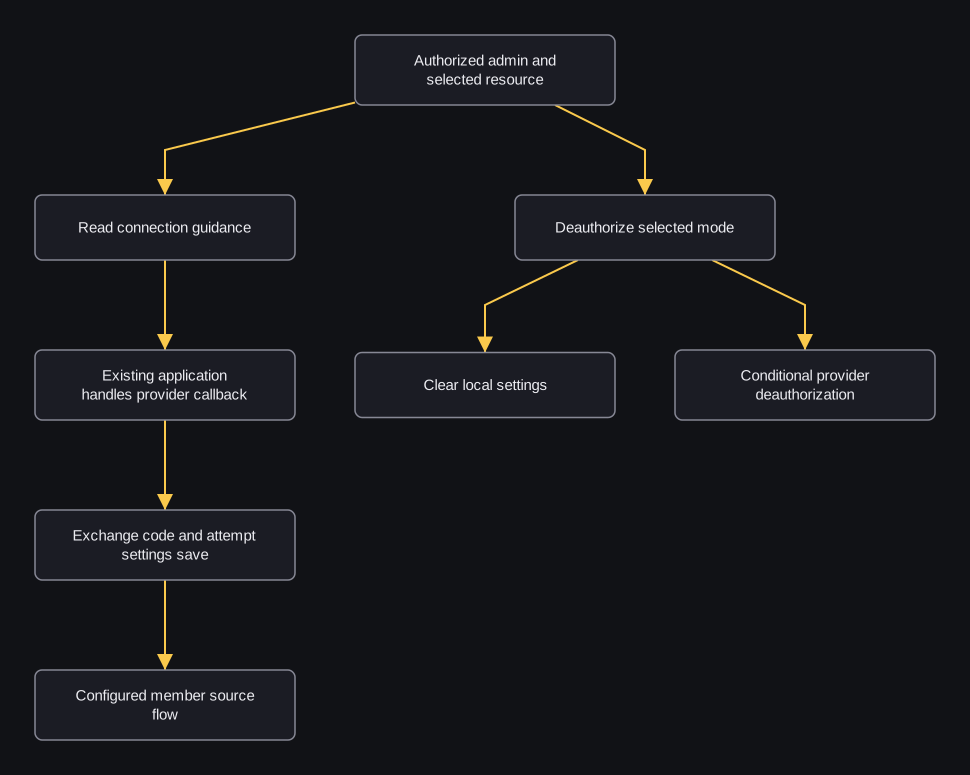
How does integration OAuth relate to member setup?
flowchart TD
  A[Authorized admin and selected resource] --> B[Read connection guidance]
  B --> C[Existing application handles provider callback]
  C --> D[Exchange code and attempt settings save]
  D --> E[Configured member source flow]
  A --> F[Deauthorize selected mode]
  F --> G[Clear local settings]
  F --> H[Conditional provider deauthorization]
Admin connection setup configures the account. The guidance response contains URLs in JSON; it does not redirect the browser. Existing application code owns callback correlation; generated state is the public resource key and exchange does not validate state. Code exchange returns private integration credentials and attempts settings persistence.
Member source setup then uses the configured account separately.
Deauthorization clears a local slot and can skip provider deauthorization when other partner resources have complete settings; it is not member logout.
Use Stripe integration operations only in an existing authorized admin context. Do not put provider access/refresh values or resource-secret credentials into member-facing browser examples. Provider/local effects and conditional guest-view cleanup need review before changing connection settings.