Firebase identity
Use this flow only for a resource with an existing Firebase integration. Begin with the API base, public resource key and the configured client/provider identity flow. Account settings describe whether this resource has enabled authentication and exposes client configuration; they do not prove provider availability.
Already-linked flow at a glance
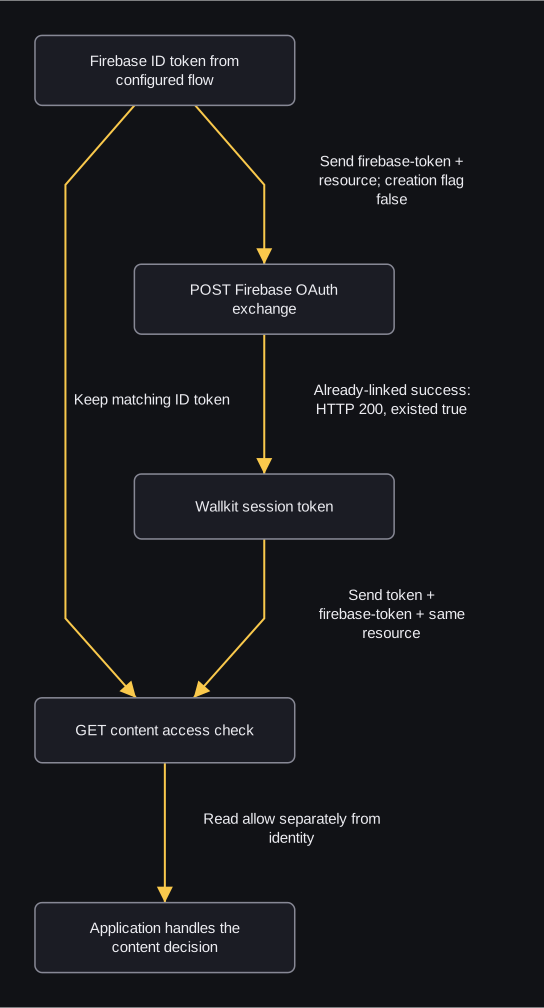
flowchart TD
    A["Firebase ID token from configured flow"] -->|"Send firebase-token + resource; creation flag false"| B["POST Firebase OAuth exchange"]
    B -->|"Already-linked success: HTTP 200, existed true"| C["Wallkit session token"]
    A -->|"Keep matching ID token"| D["GET content access check"]
    C -->|"Send token + firebase-token + same resource"| D
    D -->|"Read allow separately from identity"| E["Application handles the content decision"]
This diagram starts with an ID token already obtained through the configured Firebase flow and an identity already linked to this resource. Send it in firebase-token to the Wallkit exchange, with the exact JSON field сreate_wk_user_if_not_exist:false. When HTTP 200 returns existed:true for a linked identity, keep the returned Wallkit token separate. The content check needs both token and the matching firebase-token, plus the same resource and content key.
A Firebase custom token is an input to the configured provider client flow, not the ID token shown here and not a member header substitute. Provider completion is outside this diagram. A missing link can return 403; do not silently turn on creation. A 201/existed:false response can contain a protective placeholder token. That token does not by itself establish a usable member session. The exchange creates a session and records login activity; the content-check GET can record allowed views and access/paywall activity. Follow the reference’s branch-specific recovery rather than assuming automatic account creation or guaranteed provider success.
1. Obtain the Firebase ID token
For an existing password account, Firebase sign-in returns firebase_token_id. Its three language examples show the same email/password request. A synthetic successful excerpt is:
{"firebase_user_id":"EXAMPLE_FIREBASE_UID","status":true,"firebase_token_id":"EXAMPLE_FIREBASE_ID_TOKEN"}
Set FIREBASE_ID_TOKEN to the real ID token obtained through the configured flow. Custom-token operations return a custom token instead; complete the configured provider client flow for an ID token before proceeding. These credentials are not interchangeable.
2. Obtain the Wallkit session token
For an already-linked identity, use the Firebase-to-Wallkit exchange. It supplies resource and firebase-token headers and JSON сreate_wk_user_if_not_exist:false in all three languages. The first character of that field is Cyrillic с, not ASCII c. The request prevents an uninvited new resource relationship in this scenario.
HTTP 200 excerpt:
{"token":"EXAMPLE_WALLKIT_SESSION_TOKEN","existed":true}
Set USER_TOKEN to this Wallkit session token. If the exchange returns 403 user_resource_not_exist, choose an authorized registration/invitation flow. Do not silently enable account creation. Registration can write users, memberships, sessions and Firestore. A 201 exchange can also contain a protective placeholder token, so 201/existed:false alone does not establish usable member context.
3. Ask for content access with both tokens
Keep the same resource and matching identity. This GET can record allowed views and access/paywall activity. Avoid polling or blind retry. The article’s publishing key is article-1001, consistent with the content-access walkthrough.
cURL
curl "${WALLKIT_API_BASE}/api/v1/user/content/article-1001" \
  -H "resource: ${RESOURCE_KEY}" \
  -H "token: ${USER_TOKEN}" \
  -H "firebase-token: ${FIREBASE_ID_TOKEN}"
JavaScript
// Node.js 18+; built-in fetch.
async function main() {
  const url = new URL("/api/v1/user/content/article-1001", process.env.WALLKIT_API_BASE);
  const response = await fetch(url, {
    headers: {
      resource: process.env.RESOURCE_KEY,
      token: process.env.USER_TOKEN,
      "firebase-token": process.env.FIREBASE_ID_TOKEN
    }
  });
  console.log(response.status, await response.json());
}
main().catch(console.error);
Python
# Python 3; standard library only.
import json
import os
from urllib.error import HTTPError
from urllib.parse import urljoin
from urllib.request import Request, urlopen

url = urljoin(os.environ["WALLKIT_API_BASE"], "/api/v1/user/content/article-1001")
request = Request(url, headers={
    "resource": os.environ["RESOURCE_KEY"],
    "token": os.environ["USER_TOKEN"],
    "firebase-token": os.environ["FIREBASE_ID_TOKEN"]
}, method="GET")
try:
    with urlopen(request) as response:
        print(response.status, json.load(response))
except HTTPError as error:
    print(error.code, json.load(error))
Interpret allow using the access result definitions and the walkthrough’s allowed/denied excerpts. Identity or HTTP 200 alone does not grant the article. Follow its deny/limit handling before serving content.
For password reset or email-link sign-in, first complete that separate configured provider flow. is_sent_mail:true acknowledges the event branch; it does not prove delivery, password change or a completed sign-in. Firebase reference explains those branches and revocation scope.