From ordinary sign-in to article access
Use this flow when the integration uses ordinary Wallkit email/password identity. Firebase-based identity is a separate configuration; do not exchange its tokens through this ordinary sequence. A successful sign-in establishes member context, while an access check decides whether to serve one content item.
Flow at a glance
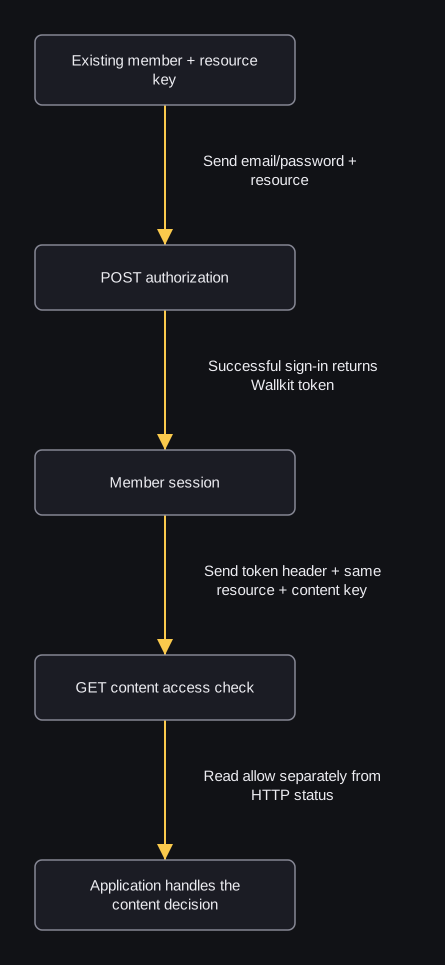
flowchart TD
    A["Existing member + resource key"] -->|"Send email/password + resource"| B["POST authorization"]
    B -->|"Successful sign-in returns Wallkit token"| C["Member session"]
    C -->|"Send token header + same resource + content key"| D["GET content access check"]
    D -->|"Read allow separately from HTTP status"| E["Application handles the content decision"]
For this successful ordinary flow, send the existing member’s email/password and resource to authorization. Put the returned Wallkit token in the custom token header for the content check, with the same resource and the publisher’s content key. Your application then handles the access result; sign-in alone does not grant the article. If sign-in fails, handle that error before proceeding.
Sign-in creates a session and records activity; the access-check GET can record allowed views and access/paywall activity. This sequence does not depend on a reusable refresh value: ordinary sign-in does not guarantee that its returned refresh value can be reused. The detailed steps below explain the conditions and recovery.
1. Prepare the context
Use the existing API base and resource public key from the integration. reader@example.com represents an existing active member; article-1001 is the publishing integration’s existing content key in that resource. Password/session placeholders are synthetic. Credential transport explains resource and token headers, and sample conventions define runtimes.
If the integration relies on a configured default membership, ask its administrator to confirm that default_subscription_id selects the intended Pricing for this resource. The resource settings reference distinguishes that member default from default_guest_subscription_id. The configured selection does not replace the content access check below.
2. Establish the member session
This POST creates a session and records login activity. It can add a resource relationship/default membership and merge guest content access; resource session policies can affect other sessions or locks. Its returned refresh value is not guaranteed reusable. Read sign-in behavior and recovery before adapting it.
cURL
curl -X POST "${WALLKIT_API_BASE}/api/v1/authorization" \
  -H "resource: ${RESOURCE_KEY}" \
  -H "Content-Type: application/json" \
  --data '{"email":"reader@example.com","password":"EXAMPLE_PASSWORD_DO_NOT_USE"}'
JavaScript
// Node.js 18+; built-in fetch.
async function main() {
  const url = new URL("/api/v1/authorization", process.env.WALLKIT_API_BASE);
  const response = await fetch(url, {
    method: "POST",
    headers: {
      resource: process.env.RESOURCE_KEY,
      "Content-Type": "application/json"
    },
    body: JSON.stringify({
  "email": "reader@example.com",
  "password": "EXAMPLE_PASSWORD_DO_NOT_USE"
})
  });
  console.log(response.status, await response.json());
}
main().catch(console.error);
Python
# Python 3; standard library only.
import json
import os
from urllib.error import HTTPError
from urllib.parse import urljoin
from urllib.request import Request, urlopen

url = urljoin(os.environ["WALLKIT_API_BASE"], "/api/v1/authorization")
body = {'email': 'reader@example.com', 'password': 'EXAMPLE_PASSWORD_DO_NOT_USE'}
request = Request(
    url,
    data=json.dumps(body).encode("utf-8"),
    headers={"resource": os.environ["RESOURCE_KEY"], "Content-Type": "application/json"},
    method="POST",
)
try:
    with urlopen(request) as response:
        print(response.status, json.load(response))
except HTTPError as error:
    print(error.code, json.load(error))
HTTP 200 response excerpt:
{"id":1001,"email":"reader@example.com","token_type":"bearer","token":"EXAMPLE_WALLKIT_SESSION_TOKEN"}
Keep the returned token with the member’s session. Send it in the custom token header, not an Authorization Bearer header. An authorization_fail/401 result means this step failed: show the sign-in, reset initiation or account-resolution flow described in the reference, and do not proceed as an authenticated member. This guide does not depend on a returned refresh token working.
3. Identify article-1001
Take this resource-scoped key from the publishing integration, not from a public Pricing. Read metadata if the UI needs its title/type. A catalog Plan/Pricing is a choice; a membership is an existing relationship. Metadata and sign-in responses do not decide article access.
4. Obtain and handle the content decision
The access-check GET can record allowed views and access/paywall activity; repeated checks can affect later limits. Use the token from step 2 as USER_TOKEN and keep the same resource key. Follow the article-access walkthrough for equivalent requests to GET /api/v1/user/content/article-1001 and paired allow/deny responses.
- allow:true: your application may serve article-1001 according to that decision.
- HTTP 200 with allow:false: withhold it and show the integration’s access/membership UI. A valid sign-in can still lack an entitlement.
- Identity/HTTP error: handle the specific session/resource/account failure; do not interpret a network failure as permission.
5. Explain the result when useful
The existing walkthrough’s follow-up details read explains prior views and applicable limits without recording another allowed view. It is not a second allow decision. Next, use the operation-selection guide to choose public Pricings versus existing memberships when building the surrounding UI.
Related identity tasks
- Register a new resource member when the account is not linked yet; confirmation remains a separate operation.
- Request a reset, then confirm its code. Code confirmation clears the applicable password and establishes a session; then set the new resource password with that session token and the same resource context. For an existing resource relationship, code confirmation also sets resource confirm false and clears language/settings/Firebase UID while global user confirm becomes true. In a Firebase-enabled configuration, resolve the configured identity/link context before relying on matching provider credentials; the returned session does not guarantee uninterrupted continuation. The initial-password operation requires a resource relationship with no stored resource password and matching password/password_confirm. Read its provider and resource-setting effects before adapting it.
- Refresh an existing stored credential only when the integration has a valid Wallkit refresh record. This ordinary sign-in walkthrough makes no automatic refresh promise.
- Log out when leaving the session; its GET can affect other resource sessions.