Register content, check access, and show or lock it
You publish “An introduction to synthesis.” Robin opens the article. Your integration tells Wallkit which article and visitor it is checking. Wallkit returns an access decision. Your integration then shows the authorized article or keeps its protected content unavailable to Robin.
There are three responsibilities:
- You supply the item. Give it a stable identity, a title and any useful classification.
- Wallkit decides access. It evaluates this visitor under your configured access rules.
- Your publishing integration presents the result. It delivers authorized content or shows a locked view with a suitable access prompt.
Here, lock or unlock means this visitor’s view. Registering an article does not grant access. These calls do not toggle a global article lock, change its access policy or return its body.
Decision at a glance
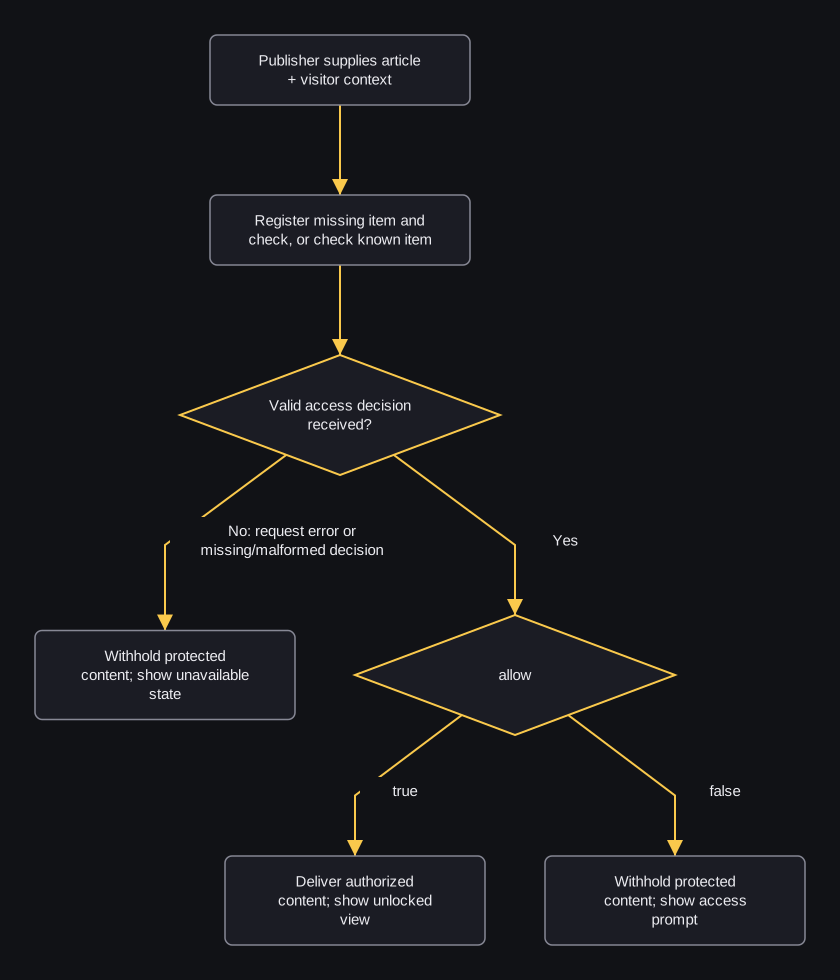
flowchart TD
    A["Publisher supplies article + visitor context"] --> B["Register missing item and check, or check known item"]
    B --> C{"Valid access decision received?"}
    C -->|"No: request error or missing/malformed decision"| D["Withhold protected content; show unavailable state"]
    C -->|"Yes"| E{"allow"}
    E -->|"true"| F["Deliver authorized content; show unlocked view"]
    E -->|"false"| G["Withhold protected content; show access prompt"]
| State | What the visitor sees | What the integration does |
|---|---|---|
| Checking | A loading or checking state. | Withhold protected content while waiting for this visitor’s decision. |
| Allowed | The authorized article. | Deliver/show it only after a valid allow:true decision. |
| Denied | A suitable sign-in, membership or access prompt. | Withhold protected content after a valid allow:false decision. HTTP 200 can still mean denied. |
| Request failure | An unavailable state with an appropriate recovery/support option. | Withhold protected content. Handle the failure without presenting it as a subscription denial or permission. |
1. Choose your context
A resource identifies your publication/integration. Use its existing API base and public key, configured access rules and the correct visitor context. The public key alone does not identify the visitor.
For a member, use their existing user token. For a guest, use a stable session identifier and the configured guest flow. Firebase-enabled member calls also require their Firebase ID token. Read request setup and credential transport.
Before registering missing content, ask the integration administrator to confirm that content_sync_and_check is enabled. For guest-plan decisions, default_guest_subscription_id must select the intended guest Pricing. The separate default_subscription_id selects a configured member default. See existing resource settings. Selecting a default Pricing does not itself grant article access.
2. Identify the content
Use one stable content key within the selected resource. The publishing integration supplies it; the numeric record ID is not the access-check path key.
| Item detail | Compact example |
|---|---|
| Key | article-1001 |
| Type | article |
| Title | An introduction to synthesis |
| Link | https://example.com/articles/1001 |
| Optional classification | Categories → Music; Tags → Synthesis, Tutorial; Author(s) → Alex Rivera |
A taxonomy is a grouping dimension such as Categories, Tags or Author(s); a term is a value within it, such as Music, Synthesis or Alex Rivera. These are illustrative publishing groupings, not fixed API taxonomy keys. Classification describes the article. Applicable access rules are configured separately. For precise inputs, use the Integration Library object, classification examples and serialization details.
If you need to display an already registered item’s metadata, use the metadata reference and language examples. A metadata read is optional when your publisher already supplies the key. It does not evaluate the visitor or authorize delivery.
3. Ask for the visitor’s access decision
Choose the path that matches the item:
- Missing item, intended registration: use enabled sync-and-check. It can register missing metadata and return the visitor’s decision in one request. Use that decision directly; do not add a second access check. Read its prerequisites and minimal request.
- Already registered item: use check-only, with the correct key and visitor context. Its prerequisites explain member/guest handling.
- Existing Integration Library: after the integration’s
readycallback, constructnew wk.content(content)using the documented input, then callcheckAccess(). The library checks first and uses sync-and-check only onincorrect_content_key. Existing items stay on the check-only path. Use the returned result; do not add another check after its fallback.
Creation and permission are separate. Sync-and-check can create the item and related records before returning a denial; that creation persists. Existing items are not overwritten from the supplied creation fields.
Access checks can record allowed views and access/paywall activity. Repeated checks can affect limits. Avoid background polling and blind retries.
4. Handle a denied decision
Interpret the shape returned by the call you use:
- REST: a successful decision response uses boolean
allow. Read the exact decision fields and check result. - Integration Library: a successful result has
{allowed, data}, wheredatais the API decision. A caught failure has{allowed:false, error}. That false value alone cannot tell denial from failure.
For library handling, first reject a result containing an error or missing/malformed data. Require a boolean data.allow and a boolean allowed that agrees with it before using the decision. Treat an inconsistent result as unavailable. For REST handling, require a successful request and a valid decision with a boolean allow; do not accept truthy strings or HTTP 200 alone as permission.
Illustrative pseudocode: normalize a valid REST or library result to decision first. The following describes application actions, not callable Wallkit methods.
IF request failed OR decision is missing/malformed:
    Withhold protected content; show an unavailable state
ELSE IF decision.allow is true:
    Deliver authorized content; show the unlocked article
ELSE:
    Withhold protected content; show the appropriate access prompt
A valid denial can arrive with HTTP 200 and a valid member token. Its reason/message explain this result. The documented values are not a complete list of access rules. Do not blindly retry a denial.
A request failure needs its own recovery: correct the supplied resource/key, resolve an expired session through the existing identity flow or ask the administrator about a locked account. Use check-only recovery, sync-and-check recovery and shared response conventions.
After identity or entitlement changes
After an intentional sign-in, visitor switch or entitlement change, obtain a fresh decision for the correct visitor and article before unlocking. A login/payment callback alone is not an access grant. Reset the view to checking while obtaining the new result; one visitor’s allowed result must not authorize another visitor.
Use check-only for the now-known article, or the supported library flow above. Follow identity to article access and User subscriptions and Pricing selection for the relevant next task. Avoid polling or blind retries while waiting for a change.
5. Explain limits when useful
Use optional content-specific access details and language examples when you need plan limits or prior-view information. Its result fields include plan_title, is_full_access, grouped content_types/content_terms and is_content_viewed. It adds no new allowed view and is not a second permission decision. Use the actual access-check result to decide what to deliver.
For public Pricings, current memberships and cross-resource summaries, choose the right catalog/access call.
6. When the item is not registered
Use the missing-item path in step 3 only when registration is intended and sync-and-check is enabled. A creation can persist even when access is denied; existing content is not updated from creation fields. The canonical registration reference owns the complete request and classification examples.
Presentation and protected delivery
The supplied demo setup maps allowed to presentation: its frontend/CSS paths remove or add paywall elements and blur/hide classes, and can restore content already held in the page. The library emits check-user-access with a boolean and check-access with a response or error; a false notification alone cannot distinguish denial from failure. Use the validated result flow above.
The demo’s unlockContent event forces an allowed presentation branch. Dispatching it does not obtain an access decision. This guide does not teach lock() or unlock() library methods.
Hiding already delivered protected text with CSS does not secure delivery. The publisher’s delivery system must enforce access before sending the protected body. A browser prompt, blur effect or hidden element is presentation, not evidence of server-side protection. An access decision or this demo alone is not a complete protected delivery system.