Choose the right catalog and access call
Business terms
| Term | Meaning |
|---|---|
| Resource | A publication/integration context. Its public key selects catalog, settings and content identity; it is not a secret. |
| Plan | Defines content-access rules and has many Pricings. Listing a Plan grants no access. |
| Pricing | A configured choice under a Plan, with price/currency/period. Wallkit Admin uses Add Pricing/Edit Pricing. Public lists show available Pricings rather than memberships. |
| Membership | A user’s relationship to a plan/Pricing, with dates and renewal choices. It must already exist for these account reads. |
| Content key | Publisher-defined item identifier within a resource; different from the numeric content ID. |
| Cascade access | An applicable plan/event entitlement drawn from another resource of the same partner. An empty cascade response is not a content access decision. |
Wallkit’s product term is Pricing (plural Pricings). Existing API routes and fields retain subscription naming: /subscriptions, subscription_id, next_subscription and similar keys refer to Pricing where the operation selects a configured catalog item. A member’s subscription relationship is a membership, with its own dates and renewal choices. Keep that distinction when reading the API; routes, JSON keys and literal returned messages keep their exact spelling.
Choose an identifier from the object named by the operation: use the selected Pricing ID for a catalog selection, and the member’s relationship record for membership dates and renewal state. The shared subscription spelling does not make those objects interchangeable. Follow the catalog field definitions and membership field definitions for each returned shape.
How the terms connect
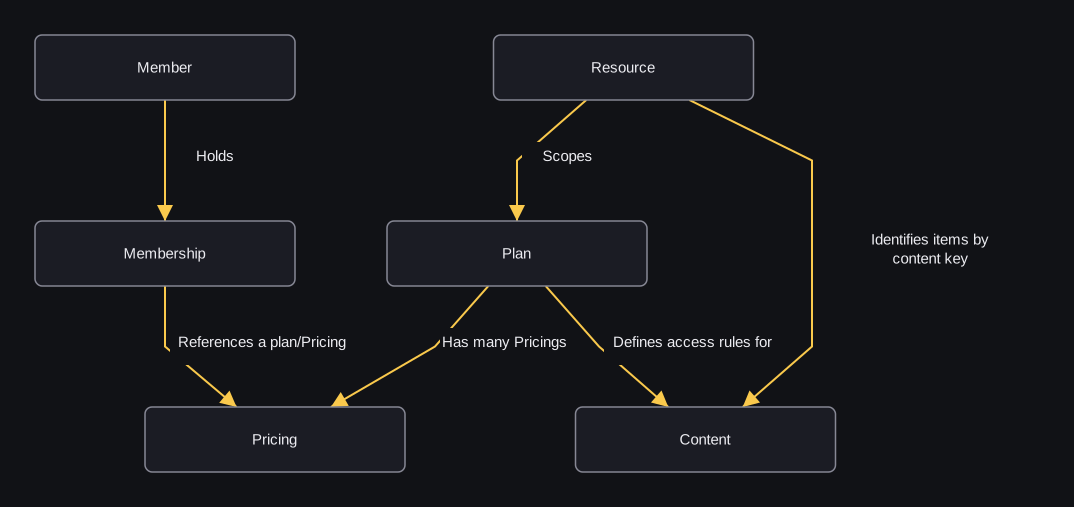
flowchart TD
    R["Resource"] -->|"Scopes"| P["Plan"]
    P -->|"Has many Pricings"| O["Pricing"]
    U["Member"] -->|"Holds"| M["Membership"]
    M -->|"References a plan/Pricing"| O
    R -->|"Identifies items by content key"| C["Content"]
    P -->|"Defines access rules for"| C
A resource selects the integration context for plans and content. A plan groups access rules and Pricings; a Pricing describes a configured subscription choice. A membership ties an existing member to a plan/Pricing. A content key identifies an item within the resource. Each Plan has many Pricings in the product model. This map does not define database constraints or a purchase sequence.
These relationships do not grant an article automatically. The separate access check evaluates the applicable rules and configured exceptions, such as prior views, purchases, bundles, guest/IP handling or partner/event access. Inspect its allow result even when the member has a membership or the catalog lists a Pricing.
Choose an operation
| Job | Operation family |
|---|---|
| Show active public Pricings | Public Plan/Pricing lists |
| Read a known plan or Pricing | Plan detail / Pricing detail; list visibility rules do not apply identically |
| Show a member’s current plans | User plans with its singular membership subscription |
| Show plans linked to team-capable ownership | Team plans; different relationship selection |
| Load an embedded legacy catalog | Integration plans; not a substitute for public-list visibility filtering |
| Read content metadata | Content detail; not an entitlement decision |
| Decide whether to serve content | Access check; inspect allow |
| Register missing content before checking | Sync-and-check; resource must enable it |
| Explain plan limits / usage | Access details; not the same shape as an access decision |
| Show cross-resource account summaries | Resources; outer pages paginate resources, not nested records |
| Explain partner-provided entitlements | Cascade access |
Public list operations filter active/non-private Pricings, with a valid invite widening selected Plan/Pricing visibility only on the plan list. Detail operations scope a known ID to a resource and can include inactive/private entries; finding a record is not purchase eligibility or entitlement.
Access checks evaluate member/guest plan rules, prior allowed views, purchases, bundles and applicable partner/event access. The access-check guest branch needs an established guest session and configured default guest subscription. Access-details reads can summarize a configured guest/IP-access plan. An allowed check can record a view; access-details reads explain limits without recording a new allowed view. Metadata lookup alone does not evaluate or grant access.
Next: follow the article-access walkthrough to connect content identity, visitor context and a serving decision.