3rd party integration flows
Choose the configured provider, read the right choices, send a deliberate change and interpret its result. Provider audience/contact state is separate from Wallkit membership and article access.
Choose the job and context
Use the existing API base, resource public key and authorized session supplied for the integration. Credential transport compares these contexts. Provider keys and OAuth settings must already be stored for the selected resource. Do not send them as request credentials; this guide does not create them.
| Reader job | Start here | Context and result |
|---|---|---|
| Build Mailchimp choices or inspect member flags | Interest catalog, groups, member flags | Active member/resource. Provider choice IDs and member flags are different reads. Empty collections can reflect missing provider data. |
| Subscribe/unsubscribe or activate Mailchimp tags | Subscribe, unsubscribe, tags | Stored member email. Subscribe/unsubscribe can target another user only for global admin/root; tags always use current member. HTTP 200 can be incomplete. |
| Discover Campaign Monitor shown lists | Public list discovery | Guest/resource. Stored list configuration, not provider refresh or member state. |
| Read/change Campaign Monitor member state | Member lists, subscribe, unsubscribe | Active member/resource. The target role check differs from Mailchimp. Changes can partly fail with HTTP 200. |
| Read/change ActiveCampaign tags | Local catalog, member tags, update | Active member/resource; member operations require a relationship. Local IDs select writes. Member GET also synchronizes the provider contact. |
| Inspect mapping choices | Mailchimp fields, HubSpot fields, Streak fields | Provider labels plus separate Wallkit selectors, not saved mappings/values. Streak needs support/inherited/root access; ordinary member context is insufficient. |
| Submit an existing configured event | Event tickets: submit a configured event | Separate resource-based submission path; result:true is not queue acceptance or a provider preference change. |
Mailchimp, Campaign Monitor member calls and HubSpot/Streak follow API configured-Firebase resolution. Campaign Monitor public list discovery and ActiveCampaign do not apply that API-specific replacement branch. Follow the exact reference and supplied session context.
Keep identifiers separate
| Value | Origin | Use |
|---|---|---|
| Mailchimp interest ID | Provider catalog/returned member map | Key in subscribe interests; not a Wallkit user ID. |
| Mailchimp merge tag | Provider synchronization choices, such as FNAME | Key in merge_fields; not a Wallkit selector such as User.email. |
| Campaign Monitor local id | Stored list discovery | Identifies the Wallkit row; do not send it in lists. |
| Campaign Monitor list_id | Stored configured provider list key | Entry in subscribe/unsubscribe lists. Writable show/require/allowed rows can exceed public shown rows. |
| ActiveCampaign id | Local tag catalog/model | Key in PUT tags. |
| ActiveCampaign tag_id | Stored provider tag identifier | Provider association; do not substitute for local PUT key. |
| Wallkit user_id | Existing Wallkit user record | Optional target only where the exact operation permits it; never a provider ID or authorization token. |
Mailchimp: choices to a selected subscription
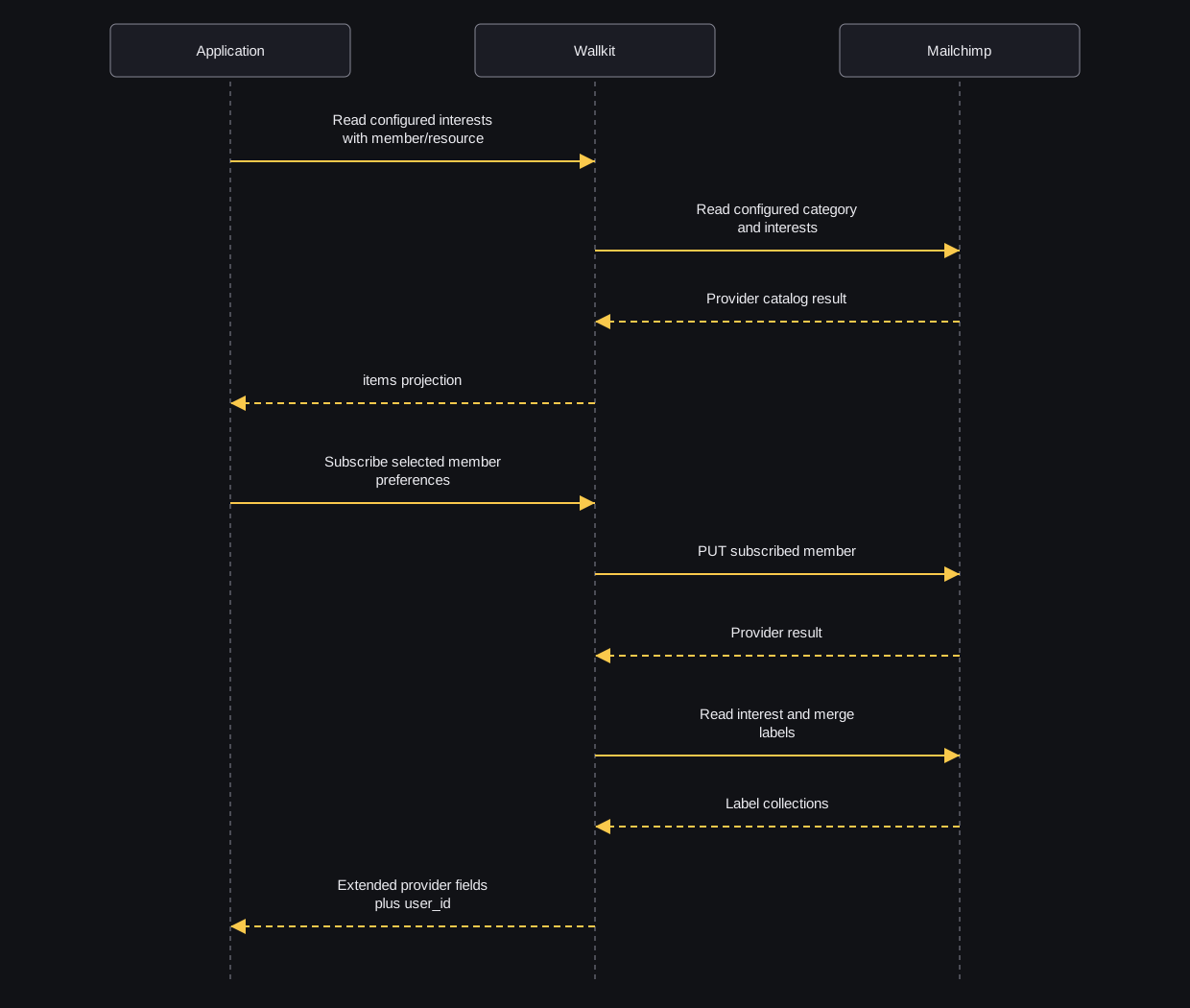
This ordered example assumes current member 1001 has stored email reader@example.com, the resource already has Mailchimp configured, and its provider category includes the synthetic interest-example. Examples are synthetic and unexecuted; each linked request has equivalent cURL, Node fetch and Python urllib versions.
-
Read the configured interest catalog. A synthetic excerpt is:
{"items":[{"id":"interest-example","name":"technology"}]}Display the label and retain its provider ID. This is a choice catalog, not the member’s selection. If items is empty, handle no choices and ask the owner about unexpected provider/configuration results; it is not a provider-health check.
-
Read current member flags when existing preferences are needed. Do not substitute subscriber-info: that GET unconditionally attempts a subscribing PUT, even after finding an existing member.
-
After the member chooses a subscribing update, send the subscribe request. Assume FNAME is an existing merge tag:
{"merge_fields":{"FNAME":"Reader"},"interests":{"interest-example":true}}Email comes from the selected member, not this body. Subscribe sends subscribed status for new and existing subscribers. Empty merge values—including false, 0, "0" and null—are dropped, so they do not clear provider fields. Nonempty interests forwards false values; omission/empty is not “clear all.”
-
Interpret the returned extended projection. A synthetic HTTP 200 excerpt is:
{"status":"subscribed","user_id":1001,"interests":[{"id":"interest-example","name":"technology","subscribed":true}],"merge_fields":[]}Returned interests and merge fields are arrays with added labels. Some labels can be missing. Other provider fields are returned unchanged. A user_id-only HTTP 200 or provider error fields leave the subscription unconfirmed. Follow-up label reads can fail after the write; inspect state with the owner before repeating.
-
Use unsubscribe only when an audience unsubscribe is intended. Its interests and merge_fields remain raw provider maps, unlike subscribe’s arrays. Add tags activates selected current-member tag names; omitted tags stay untouched, nonstrings are skipped, duplicates are forwarded, and success returns no per-tag data.
What does the response establish?
sequenceDiagram
  participant App as Application
  participant WK as Wallkit
  participant MC as Mailchimp
  App->>WK: Read configured interests with member/resource
  WK->>MC: Read configured category and interests
  MC-->>WK: Provider catalog result
  WK-->>App: items projection
  App->>WK: Subscribe selected member preferences
  WK->>MC: PUT subscribed member
  MC-->>WK: Provider result
  WK->>MC: Read interest and merge labels
  MC-->>WK: Label collections
  WK-->>App: Extended provider fields plus user_id
The application makes separate catalog and mutation requests. Wallkit calls the provider synchronously. The final arrow shows the usual response fields. When the provider result is empty or otherwise false in a boolean check, the response can contain only user_id. Provider errors can arrive with HTTP 200, and a request can fail after the subscribing PUT. This is not a delivery receipt, consent record or membership grant. No queue acknowledgment is part of this Mailchimp flow.
Campaign Monitor: discover, select, interpret
-
Read shown stored lists with resource only. If local id is 1001 and list_id is list-example, retain list-example for mutations. Discovery does not confirm provider connection health or subscription.
-
Establish the exact member context and read member lists. Provider reads are forced and write a 600-second cache. subscribed is true only for Active; blank state can follow a caught provider client error. updating is always false, not progress evidence.
-
Submit subscribe or unsubscribe with the intended provider IDs:
{"lists":["list-example"]}Omitted lists are untouched, IDs outside show/require/allowed are skipped, and duplicates can repeat calls. Subscribe uses stored name/email and configured mappings; missing mapped values become empty strings. Resubscribe/autoresponder/tracking flags are adapter defaults, not caller consent evidence. Unsubscribe skips missing/blank, Unsubscribed, Unconfirmed and Bounced states.
-
Inspect each returned list plus error fields. A synthetic HTTP 200 failure excerpt is:
{"error":"error_synchronization","error_description":"CM subscribe error","req_guid":"example-request","lists":[{"list_id":"list-example","subscribed":false,"state":"","updating":false}]}Lists can partly change before a later failure; a final reread can also fail after writes. Some provider add errors return false without an outward error. Use operation recovery and inspect state before another write.
ActiveCampaign: local choices to selected tag changes
-
Read the allowed local catalog. Assume local IDs 1001 and 1002 map to existing provider tags; retain those local IDs.
-
Read member tags only when its provider contact-sync write is intended. It uses current stored email and requires an existing member-resource relationship. It returns matching local models without the catalog’s allowed_for_users filter; unmatched provider tags are omitted.
-
Send selected changes:
{"tags":{"1001":true,"1002":false}}True adds and false removes. Use Booleans: nonempty text "false" is truthy and adds. Unknown keys are skipped and omitted keys untouched. Contact sync still happens if every key is unknown. The write does not enforce allowed_for_users or required flags.
-
Interpret returned local models, not a per-key receipt. Additions/reads/removals/reread run sequentially; failure can follow partial writes. The later queued notification attempt does not establish queue acceptance. An empty items array does not prove every removal happened or no provider tags remain. A recovery GET also synchronizes the contact.
Field choices are not field values
Mailchimp, HubSpot and Streak return provider labels alongside sorted Wallkit selector strings. They do not save mappings or return member field values. Empty provider catalogs can coexist with Wallkit choices.
HubSpot’s settings-object guard does not verify its configured OAuth-token value. Streak skips entire fieldless pipelines, including stages, and combines field/stage keys into one potentially colliding map. When the pipeline result is empty or otherwise false in a boolean check, the response returns HTTP 406. Nonempty pipelines with no selected fields can return an empty map with HTTP 200. Read the exact support-level access and recovery before adapting that request.
Finish the application task
Keep preference state, provider delivery and Wallkit membership separate in the UI. For membership tasks, use subscriptions; for article delivery, obtain a separate content-access decision. A provider preference update or event response does not establish either.