Event tickets: submit a configured event
Send an event name, value and optional application data for an existing resource. Use this when the integration owner has supplied a configured public event name. This guide describes submission; it does not define a webhook receiver, outbound delivery contract or provider preference operation.
Prepare the context
Use the supplied resource public key in custom resource header. Guest submission is permitted; an optional member token selects the resolved member. Existing configured Firebase identity resolution can apply. The request requires a resource, but it does not require an active member. See credential transport and the exact event inputs.
Event names are validated against a cached global list of nonprivate configured names, not a per-resource handler registry. Obtain the intended name from the integration owner; this guide does not invent a built-in enum or promise which downstream handler is installed.
| Value | Reader decision |
|---|---|
| name | Existing public name; lowercased and stripped of tags before matching. |
| value | Meaningful nonempty text for that event; lowercased and stripped of tags. No universal event-value schema. |
| data | Optional nested application object; no event-specific nested allowlist is enforced here. |
| content_key | Optional trimmed content reference; no article-existence or access check here. |
| custom_recipient_email | Optional email-filtered/lowercased/trimmed text; no dedicated validity check or email-delivery promise. |
Wallkit supplies resolved user/resource/session and request context. Top-level body user_id/resource_id/session_id do not select identity. Nested data cannot overwrite those top-level fields. Guest submission does not acquire a member identity merely because data contains a user ID.
Submit and interpret once
This synthetic example assumes the owner has already configured public name example_preference_saved. It is not a default event. The full request example has equivalent cURL, Node fetch and Python urllib versions, with resource only:
{"name":"example_preference_saved","value":"enabled","data":{"source":"example preference form"}}
Synthetic HTTP 200 excerpt:
{"result":true}
Treat result:true as confirmation that the submission call returned. The response contains no queue message ID or downstream handler result. Queue-send failures can be caught without changing result:true, so it does not confirm queue acceptance. It cannot establish email delivery, subscription, consent, membership or content permission.
Where does the event go?
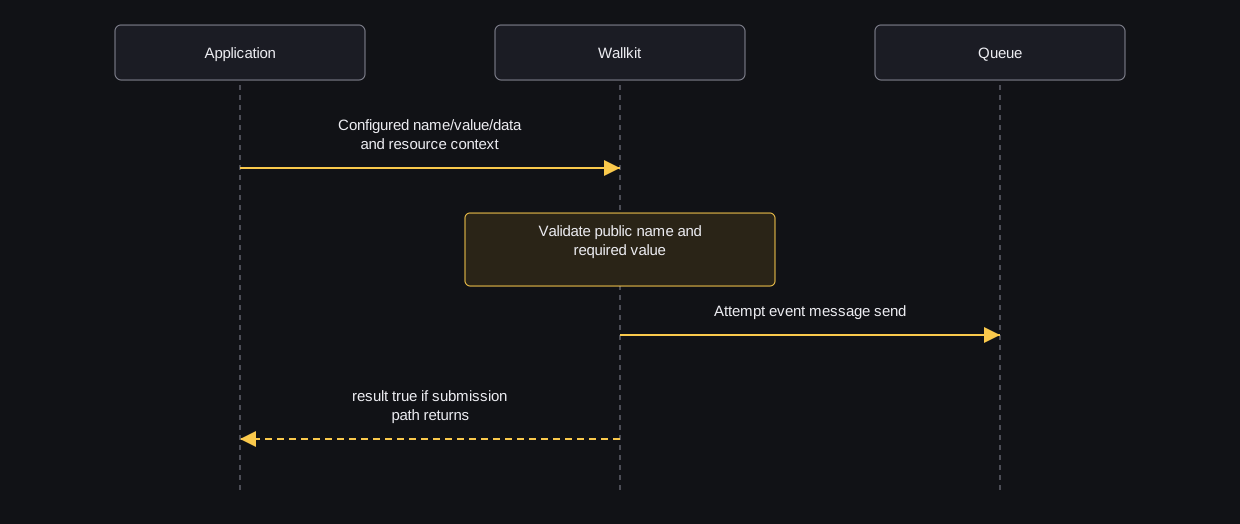
sequenceDiagram
  participant App as Application
  participant WK as Wallkit
  participant Queue as Queue
  App->>WK: Configured name/value/data and resource context
  Note over WK: Validate public name and required value
  WK->>Queue: Attempt event message send
  WK-->>App: result true if submission path returns
Wallkit validates the configured name/value, supplies request identity/context and attempts the queue send. There is no queue-receipt arrow because the HTTP response does not expose that outcome. A caught send failure can still end with result:true. An initialization failure can interrupt the request instead. This diagram does not show guaranteed downstream handling, delivery or ordering.
Handle a rejected name
For an unknown name or unavailable public-list lookup, a synthetic HTTP 409 response is:
{"error":"invalid_event_name","error_description":"Event with this name not found","req_guid":"example-request"}
Check the owner-supplied configured public name and integration context. Missing name/value have their own recovery rows. Send valid JSON; malformed/absent input can reach name validation rather than a dependable HTTP 406 branch.
Do not blindly repeat an unconfirmed request: repeats attempt another send, with no deduplication guarantee. There is no promised retry, ordering or delivery contract. Ask the integration owner to check application or queue records for downstream effects.
Choose the next task
For provider preferences, follow 3rd party integration flows and the exact provider operation. For membership, read subscriptions; for article delivery, follow content access. None follows automatically from result:true.